StoryHawk Blog
LiveBlogPosting Schema: Booster for Top Stories Success
Live blogs are web pages that are frequently updated during events like the General Elections. Each update can be set up to show as a detailed preview within the blog.
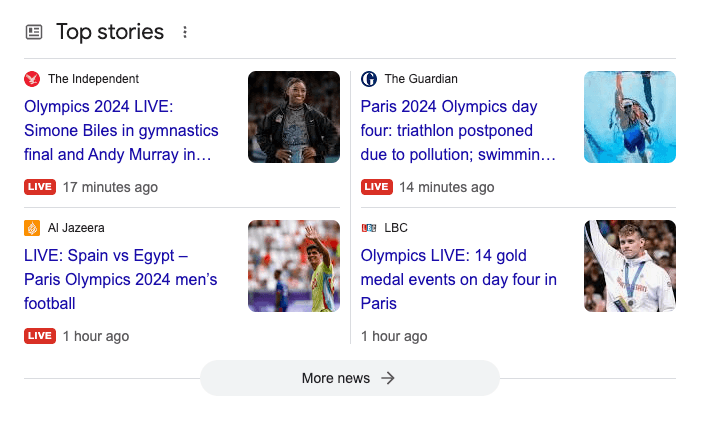
How often Google is showing the "Live" badge/pill on Top Stories?
During the Paris Olympics 2024, our data shows that the distribution between the badges is as follows:
- LiveBlog badge/pill is dominating with 66.6%
- Video badges, which are not that popular reached 29.1% of all badges
Overall, Google is showing the LiveBlog badge on only 3.5% of the results in Google Top Stories.
LiveBlogPosting Schema Markup
<!DOCTYPE html>
<html>
<head>
<title>A Non-AMP Live Blog</title>
<script type="application/ld+json">
{
  "@context": "https://schema.org",
  "@type": "LiveBlogPosting",
  "mainEntityOfPage": {
    "@type": "WebPage",
    "@id": "https://example.com/live_blog/"
  },
  "url": "https://example.com/live_blog/",
  "datePublished": "2024-08-09T11:30:00-07:00",
  "dateModified": "2024-08-09T16:00:00-07:00",
  "coverageStartTime": "2024-08-09T11:30:00-07:00",
  "coverageEndTime": "2024-08-09T16:00:00-07:00",
  "about": {
    "@type": "Event",
    "startDate": "2024-08-09T13:00:00-07:00",
    "name": "A Non-AMP Live Blog",
    "location": {
      "@type": "EventVenue",
      "name": "John Doe",
      "address": {
        "@type": "PostalAddress",
        "streetAddress": "123 Main St",
        "addressLocality": "Los Angeles",
        "addressRegion": "CA",
        "postalCode": "90001",
        "addressCountry": "US"
      }
    }
  },
  "publisher": {
    "@type": "Organization",
    "name": "Example Publisher",
    "logo": {
      "@type": "ImageObject",
      "url": "https://example.com/logo.png",
      "height": "60",
      "width": "600"
    }
  },
  "author": {
    "@type": "Person",
    "name": "John Doe"
  },
  "headline": "A Non-AMP Live Blog",
  "description": "A Live Blog implementation without AMP",
  "image": {
    "@type": "ImageObject",
    "url": "https://example.com/image.png",
    "height": "1532",
    "width": "2046"
  },
  "keywords": "Live Coverage, LiveBlogPosting",
  "liveBlogUpdate": [
    {
      "@type": "BlogPosting",
      "headline": "City Skyline",
      "url": "https://example.com/live_blog/#post1",
      "datePublished": "2024-08-09T11:30:00-07:00",
      "articleBody": "A beautiful city skyline at sunset."
    },
    {
      "@type": "BlogPosting",
      "headline": "Ocean View",
      "url": "https://example.com/live_blog/#post2",
      "datePublished": "2024-08-09T16:00:00-07:00",
      "articleBody": "A serene view of the ocean waves."
    }
  ]
}
</script>
</head>
<body>
</body>
</html>
You can also use Microdata to mark up your live blog instead of JSON-LD. In this case, text-only live blog posts will be displayed alongside the main image of the entire live blog.
Guidelines for Using LiveBlogPosting Markup
A LiveBlogPosting includes multiple liveBlogUpdates, each of type BlogPosting, representing individual time-stamped updates to the live blog. Every BlogPosting should have an articleBody specified and can also include an image or video.
LiveBlogPosting properties
| Property | Type | Description |
|---|---|---|
| about | SportsEvent or Event | A note regarding the real-world event covered in this article. Further details can be found in the SportsEvent and Event sections below. |
| dateModified | DateTime | The latest update timestamp, presented in ISO 8601 format. When the article is initially published, this value should be identical to datePublished. |
| datePublished | DateTime | The original publication date and time, formatted according to ISO 8601. This value remains constant, regardless of any subsequent updates to the article. |
| headline | Text | The article's title. It should be concise, with a maximum length of 110 characters. |
| image.height | Integer | The image's height, measured in pixels. |
| image.url | URL | The URL of the image. |
| image.width | Integer | The width of the image, in pixels. |
| url | URL | The URL of the article which always should be specified |
LiveBlogPosting - Additional properties
| Property | Type | Description |
|---|---|---|
| image | ImageObject | There should be at least one image with a crawlable URL with a minimum of 696px wide. |
| keywords | Text | The best practice across the news publishers is to use the tags on the article as keywords in the schema markup. |
| mainEntityOfPage.@id | URL | Set mainEntityOfPage.@id when the article is the main focus of the page. This property's value should align with the canonical URL of the article page. |
BlogPosting information
Within a LiveBlogPosting, a BlogPosting type represents a single entry. Each post's content should be marked up following the guidelines provided here.
BlogPosting Properties
| Property | Type | Description |
|---|---|---|
| liveBlogUpdate | BlogPosting | An array of annotations, one for each live blog update. |
| liveBlogUpdate.datePublished | DateTime | The datetime of the blog update. Use ISO 8601 format. |
| liveBlogUpdate.articleBody | Text | The body of the blog update. In addition to text, the articleBody can contain tags to indicate line breaks, but it needs to be typed as HTML in that case. |
| liveBlogUpdate.image.url | URL | An annotation for the main image of the blog update. This property is required if a BlogPosting contains an image. |
| liveBlogUpdate.url | URL | The AMP URL for the live blog update. Generally, this will be the same as LiveBlogPosting.url with an additional HTML anchor (for example: https://www.website.com/someArticle#post). Don't use CGI parameters in the URL. |
| liveBlogUpdate.video | VideoObject | An annotation for the main video of the blog update. This property is required if a BlogPosting contains a video |
| liveBlogUpdate.video.thumbnailUrl | URL | URL to the thumbnail to be used in the video. This property is required if a BlogPosting contains a video. If video is chosen to be marked up for a BlogPosting, then video.thumbnail must also be marked up. |
What to do when a live blog expires:
When a live blog post concludes, it's important to follow these best practices:
- Remove the live blog URL from your Google News XML sitemap.
- Exclude it from the homepage, as well as any category or index pages.
- For ongoing events, consider placing a link to the live blog page prominently on the main event page as a soft redirect.
- Avoid removing the liveBlogPosting schema, as the "coverageEndTime" attribute offers valuable details about the event's coverage period.
Good examples of well-implemented LiveBlogPosting
Based on my experience, the New York Times (NYT) is always very detailed and precise in its schema markup. So if you are looking for some best practices and inspiration for some additional properties to add to your schema I would recommend having a look at their schema markup.
I'm biased but a good example is also the liveblogPosting schema markup on The Telegraph.
LiveBlogPosting schema markup debugging
To debug a LiveBlogPosting schema, you should use Schema Validator tool. You can enter the URL or you to paste the entire HTML and JSON-LD to validate. This tool will highlight any errors or warnings in your schema markup.
Validate Your LiveBlogPosting Schema
Use our free tool to validate and analyze your LiveBlogPosting schema markup. Get instant feedback on errors, missing required properties, and recommendations to improve your live blog posts for Google News and Top Stories.
Google's tool Rich Result Test specifically checks whether your structured data is eligible to generate rich results (enhanced search snippets) in Google Search.
What is the difference between the Rich Result Test and the Schema Validator?
Rich Results Test: This tool, provided by Google, specifically checks whether your structured data is eligible to generate rich results (enhanced search snippets) in Google Search. It evaluates the structured data for compatibility with Google's search features, such as rich snippets, carousels, or knowledge panels. It also highlights errors and warnings related to the specific schemas that can impact your content's appearance in search results.
Schema Validator Tool: This tool (such as Schema.org's validator) checks the correctness of your structured data against the Schema.org standards. It verifies if your markup is correctly formatted and adheres to the specifications, regardless of whether the data is eligible for rich results on Google. This tool ensures that your schema is technically accurate, but it doesn't provide information on how it will be displayed in search engines.